


The South African Revenue Service (SARS) has confirmed the official SARS Tax Season 2026 dates, with Auto Assessments running from 1 to 12 July 2026 and tax return submissions opening on 13 July 2026.
South Africans who need to file tax returns should take note of the deadlines, which vary depending on whether they are non-provisional taxpayers, provisional taxpayers or trusts.
SARS has also introduced several changes for the 2026 filing season, including more prefilled information, improved eFiling functionality and expanded WhatsApp services.
ALSO READ: SARS introduces mandatory new border rules for all foreign vehicles entering South Africa
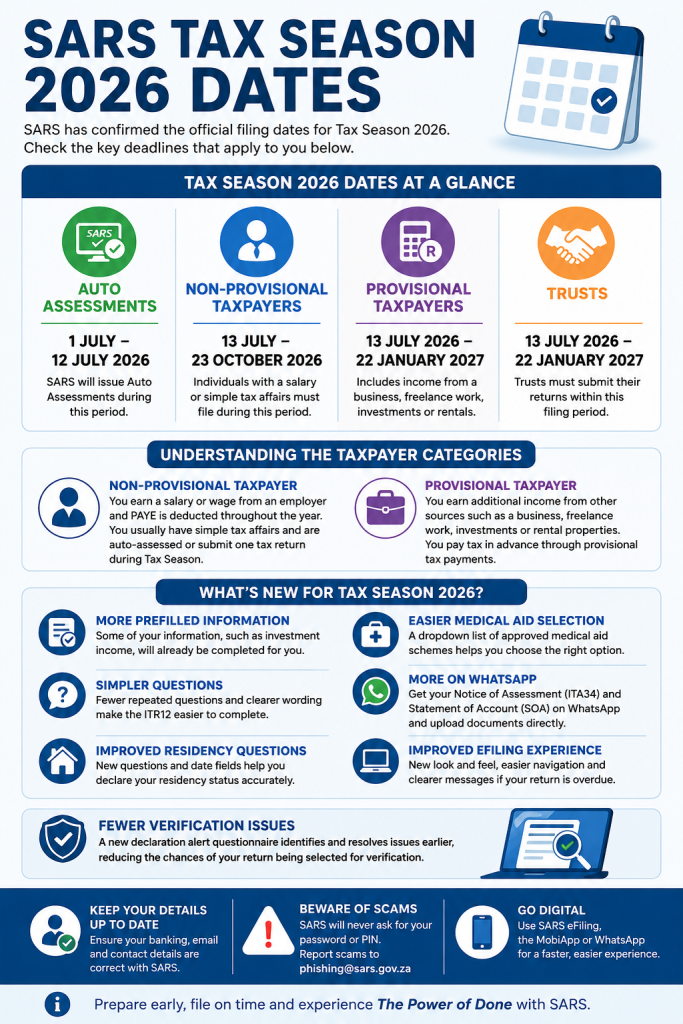
SARS Tax Season 2026 Dates at a Glance
- Auto Assessments: 1 July to 12 July 2026
- Non-provisional taxpayers: 13 July to 23 October 2026
- Provisional taxpayers: 13 July 2026 to 22 January 2027
- Trusts: 13 July 2026 to 22 January 2027
Understanding the Different Taxpayer Categories
A non-provisional taxpayer is typically someone who earns a salary or wage from an employer and has Pay-As-You-Earn (PAYE) deducted throughout the year. These taxpayers generally have straightforward tax affairs and either receive an Auto Assessment or submit one tax return during Filing Season.
A provisional taxpayer earns income in addition to a salary or from other sources such as a business, freelance work, investments or rental properties. These taxpayers pay tax in advance through provisional tax payments based on estimated earnings.
What Auto-Assessed Taxpayers Need to Do
SARS will issue Auto Assessments between 1 and 12 July 2026 to taxpayers whose tax affairs are considered less complicated.
If you receive an Auto Assessment, SARS advises that you:
- Review the assessment carefully.
- Check that all information is correct.
- Confirm that your banking details are up to date.
- Ensure your contact details are accurate.
If all the information is correct, no further action is required. There is also no need to formally accept the assessment.
If SARS owes you a refund, the money will automatically be paid into your registered bank account.
What Is an Auto Assessment?
An Auto Assessment is a tax return completed by SARS using information already received from:
- Employers
- Banks
- Medical schemes
- Retirement funds
- Insurers
This means qualifying taxpayers may not need to submit a tax return themselves.
How Will You Know if You Are Auto-Assessed?
Taxpayers selected for Auto Assessment will receive an SMS or email from SARS between 1 and 12 July 2026.
The notification will indicate whether:
- You are due a refund, or
- You need to make a payment to SARS
Taxpayers can also check their status through the SARS Online Query System (SOQS) by selecting “My Auto Assessment Status”.
SARS advises taxpayers to wait for the SMS or email notification before logging into eFiling or the SARS MobiApp.
What If You Are Not Auto-Assessed?
If you have not received an Auto Assessment notification by 12 July 2026, you will need to file your own tax return.
You must:
- Complete and submit an ITR12 tax return.
- Use SARS eFiling or the SARS MobiApp.
- File within the relevant deadlines.
Non-Provisional Taxpayers Should File Early
Non-provisional taxpayers have from 13 July to 23 October 2026 to submit their returns.
SARS encourages taxpayers not to leave submissions until the last minute.
Before filing:
- Gather all supporting documents.
- Verify personal and banking details.
- Review any prefilled information.
- Submit your return accurately and on time.
Provisional Taxpayers and Trusts Have Longer to File
Provisional taxpayers and trusts have until 22 January 2027 to submit returns.
Although the filing period is longer, SARS recommends preparing early to avoid rushed submissions and unnecessary errors.
Taxpayers should:
- Diarise the deadline now.
- Prepare supporting documents well in advance.
- Review financial records early.
- Avoid last-minute filing.
What’s New for SARS Tax Season 2026?
SARS has introduced several updates aimed at making the filing process easier and more efficient.
More Prefilled Information
Some taxpayer information, including certain investment income details, will already be completed on tax returns, reducing the amount of manual capturing required.
Simpler Questions on Tax Returns
The Income Tax Return (ITR12) has been updated with clearer wording and fewer repeated questions to improve the filing experience.
Improved Residency Information
New questions and date fields have been added to help taxpayers provide accurate residency information.
Easier Medical Aid Selection
A dropdown list of approved medical aid schemes has been introduced to help taxpayers select the correct medical aid information and reduce errors.
Expanded WhatsApp Services
Taxpayers can now access more SARS services through WhatsApp.
These include:
- Receiving Notices of Assessment (ITA34)
- Receiving Statements of Account (SOA)
- Uploading supporting documents directly through WhatsApp
This is particularly useful for taxpayers who do not regularly use email or eFiling.
Improved eFiling Experience
The updated ITR12 includes a refreshed design and improved navigation.
Taxpayers will also benefit from:
- Easier access to Notices of Assessment
- Clearer overdue return notifications
- Faster navigation across the platform
Reduced Verification Delays
A new declaration alert questionnaire has been added to identify potential issues earlier, helping reduce the chances of returns being selected for verification.
Make Sure Your SARS Details Are Updated
Before Filing Season begins, taxpayers should check that their:
- Banking details are correct
- Email address is current
- Contact information is up to date
Accurate information helps avoid delays with refunds and communication from SARS.
Beware of SARS Scams During Filing Season
SARS has warned taxpayers to remain vigilant as scammers often take advantage of Filing Season to send fraudulent emails and SMS messages.
Taxpayers should never:
- Share passwords or login details
- Click suspicious links
- Make payments to unknown accounts
Suspected phishing attempts can be reported to phishing@sars.gov.za.
SARS also provides educational videos on scam awareness and protecting eFiling credentials.
Need Help With Your Tax Return?
Taxpayers who are unsure whether they need to submit a return can use SARS’ online tools for guidance.
Support is available through:
- SARS eFiling
- SARS MobiApp
- SARS Online Query System (SOQS)
- SARS YouTube tutorials
- Mobile Tax Units and pop-up service points
- SARS Service Centres by appointment
Taxpayers who have forgotten their eFiling login details can reset their username or password online through the eFiling platform.
With SARS Tax Season 2026 starting on 1 July, taxpayers are encouraged to prepare early, review their details and take advantage of the digital services available to ensure a smoother filing experience.





Related Articles

The right order to apply your skincare products
If your bathroom shelf is groaning under the weight of serums, acids,...

Tim Curry dies at 80: Rocky Horror and It star remembered for iconic roles
Actor Tim Curry, whose unforgettable performances ranged from Dr. Frank-N-Furter in The...

Nina Swart returns to soaps as Elzette Potgieter in Suidooster
Seasoned actress Nina Swart has returned to the world of soap operas,...



Tropika Island of Treasure Season 12 heads to Réunion Island
The wait is almost over as Tropika Island of Treasure returns for...
